React To Anything. No Gear. No Studio.
How one frustrated creator stopped fighting the tools and built the thing that changed everything.
If you have ever watched a reaction video go viral and thought "I could do that", you were right. You just did not have the tools. Reaction Spark puts the clip on screen, records you reacting to it, and lifts you off your background while you record. No green screen, no editing software, no computer. Your first three videos are free and it never asks for a card.
One email the day it reaches the App Store. Nothing else, and you can leave in one tap.
Two minute demo
Watch one reaction video get made start to finish, on a phone, with nothing else in the room.
Two minutes. No sign up needed to watch it.
- 6.5M+Views in 60 days, TikTok and Instagram combined
- 1,509New followers over the same 60 days
- 160Of those videos were made with this app
- 0Green screens, computers or editing apps used
My own numbers, not a projection and not a promise. All organic, no ads and no boosting. The analytics screens they came off are further down this page.
This is the whole app, on one screen
No timeline. No tracks. No layer panel. You open it and pick what you are making, and four of these make a video.
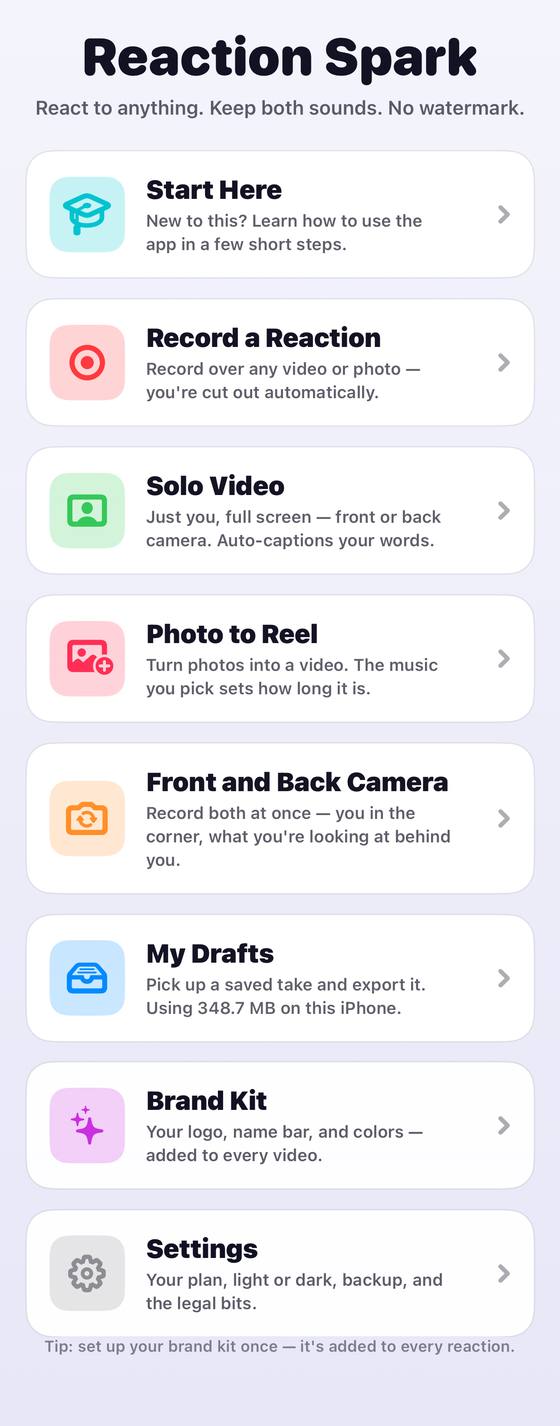
- Record a ReactionRecord over any video or photo on your phone. You are cut out of your background automatically while you record.
- Solo VideoJust you, full screen, front or back camera, with captions written from what you actually said.
- Photo to ReelTurn a set of photos into a video. The music you pick sets how long it runs.
- Front and Back CameraBoth at once. You in the corner, whatever you are looking at behind you.
The actual home screen, photographed off the phone. Brand Kit, drafts and settings sit under the same list.
I sat in my car watching someone else go viral
I want to tell you something I have never really said out loud.
I was scrolling TikTok looking for inspiration, the way you do. And the same thing kept coming up. Food fails. Weird looking food. People reacting to it.
Then I was sitting in my car in the driveway, watching one of those reaction videos rack up hundreds of thousands of views. The creator was not special. No studio. No camera crew. No five thousand dollars of gear. They had put a green screen over a video and given their honest, funny opinion about the food. That was it. That was the whole thing. And people loved it.
I thought, I can do this. I should be doing this.
So I tried.
That is where it fell apart.
I pulled up the apps everyone said to use and started trying to record myself reacting to a clip. Just finding the right effect took me about thirty minutes of trial and error. Get my face in the corner. Get the video on screen. Get both audio tracks to line up. What I ended up with was a blurry, choppy, off center mess.
Then I hit the part nobody warns you about. I could not download my own video without posting it first. Every test. Every bad take. Every attempt I was not happy with. Public, or nothing. I tried a different app and got exactly the same wall.
So I watched tutorials. I learned workflows that took longer than filming the content did. By the time I had finished editing, I had spent two hours on a ninety second video and it still did not look right.
And I remember sitting there thinking: why is this so hard?
The content format is simple. The tools are not.
That is the actual problem, and it is not your fault. The apps that exist were built for other people. Podcast editors. YouTube vloggers. Instagram photographers. Every one of them assumes somebody sitting at a desk with an afternoon, and the video you are trying to make is going to be watched on a phone by somebody scrolling.
Nothing I could find had been built for the person who wants to sit down, react to something, and have it posted in ten minutes looking clean.
So I stopped complaining about the tools. And I built one.
The question that became this app
I asked myself one thing, and it changed how I looked at the whole problem.
What would the perfect reaction video studio look like, if it lived entirely on your phone?
Not a camera rig. Not a desktop software suite. Not a forty seven step tutorial. Pick up your phone, hit record, done. That question became Reaction Spark, and the only reason it could be built at all is that phones quietly changed.
The green screen was never the point. It was just the easiest way to tell software which pixels were you. That is the whole reason the old setup exists. A flat, evenly lit sheet of one colour is simple for a computer to identify and throw away, and everything else in the kit list is there to serve it.
Your iPhone does not need to be told any more. It works out where a person is in the frame by itself, on the device, while the camera is running. Reaction Spark uses that to lift you off your background frame by frame and lay you over the clip in the same pass.
So there is no key to pull afterwards, because there is no background left to remove. The step that used to take the evening does not happen after the recording. It happens during it, and it is finished the moment you stop.
Three taps, start to posted
-
Pick the video
Any video or photo on your phone goes behind you. That is the thing you are reacting to.
-
Hit record and react
You are cut out and placed over it automatically while you record. What you see is what gets made.
-
Send it
It saves to your camera roll and opens the share sheet, so it goes straight into TikTok, Instagram, YouTube, or whichever scheduler you already post with. No watermark on it anywhere.
That is the whole app. Three taps, and the video is yours.
One email the day it reaches the App Store. Nothing else.
What the app actually does
Reaction Spark is a mobile reaction video studio. You pick the video you are reacting to, it goes behind you, and you record yourself in the corner reacting to it in real time.
- The background? Gone. Removed in real time while you record, with no green screen anywhere in the room.
- The captions? Done. Transcribed from what you actually said and burned in.
- The colour grade? Handled. One tap and a cinematic look is on the video.
- Your brand? Stamped. Your logo and name bar on every frame, set once.
- The export? One tap. Straight to your camera roll, then wherever you post, with no forced posting first.
You are not a video editor. You do not have to be.
Captions that write themselves
Your words are transcribed and burned in, so the video still lands with the sound off.
Your branding on every video
Logo, colours, fonts and your handle, set once and applied to everything you make.
Built for every feed
Export vertical for TikTok, Reels and Shorts, square or portrait for the feed, or wide for YouTube.
Six looks, one tap
Cinematic, warm, cool, vintage, black and white or vivid, graded into the video as it records. No editor, no plugin, no colour wheels.
Safe-area guides
See exactly where each platform puts its own buttons, before you post and find your face behind them.
Front and back at once
You in the corner, whatever you are looking at behind you, recorded together.
Covers and thumbnails
Pull a still out of your own video and make the picture people see before they tap play.
Who this is for
- You have watched reaction content blow up and you have something to say. The format works. You already know it works. You just need it to not take an afternoon.
- You already make green screen videos. And you are tired of shooting multiple takes and stitching them together afterwards.
- You are done spending hours editing a sixty second clip. The maths on that has never worked and it never will.
- You are building a brand in a niche. Food, sport, film, fashion, gaming, news. Whatever people are already arguing about.
The only thing it requires is that you have an opinion.
What it deliberately does not do
Most apps in this space hide their edges. Here are mine, up front, so you can decide before you download rather than after.
- It does not post for you. It saves the finished video to your camera roll and opens the share sheet. You pick where it goes and when. That is on purpose, because the thing that cost me the most time was not being allowed to hold my own file.
- It does not need a computer, a green screen, a light kit or a second phone. If it needed any of those I would not have built it.
- It does not need an account, and nothing leaves your phone. No sign up, no upload, no server holding your footage.
- It does not put a watermark on anything. Not on the paid videos and not on the free ones.
- It does not do long form editing. It makes reaction videos. That is the whole job, and it is why it is fast.
Picture this
You see a video trending. Something in your lane. Something you have thoughts on.
You open Reaction Spark. You hit record. You react, raw and real and yourself.
Under five minutes later it is finished.
Under five minutes later you have a 1080 by 1920 vertical video, with your background gone, your captions synced to your voice, a look graded over it and your branding in the corner.
You tap share. It is already in your camera roll and the share sheet is open, so it goes wherever you post.
No timeline scrubbing. No plugin crashes. No waiting for a render.
Just you, your voice, and a video that looks like somebody made it properly, because the app did the work while you were talking.
The way I was doing it
- Thirty minutes fighting an app to get my face and the clip on screen together
- Tutorials, plugins and workflows that took longer than filming did
- Two hours on a ninety second video that still looked off center
- A cluttered room I had to hide or apologize for
- Posting to TikTok first just to be allowed to keep my own video
- Six a day, on a good day
The way it works now
- The clip on screen and me lifted off my background, live, as I record
- Captions written from my own voice and burned in
- One of six looks graded on while it records
- A finished 1080 by 1920 video in the camera roll in under five minutes
- The file is mine, so it goes wherever I want on my own schedule
- Ten to twenty a day
Then I used it for sixty days
Over the sixty days that followed, my TikTok and Instagram did over 6.5 million views between them and gained 1,509 followers, all organic, with nothing paid behind any of it. Those are whole account totals, not the count for any one video, and not every post in that window came out of this app. They are my own numbers off my own accounts. They are what one person got. They are not a promise about what you will get.
- 3.4MViews on TikTok in 60 days
- 3,190,712Views on Instagram in 60 days
- 1.2MViews on my top post in 60 days
- 566KViews on the one below it in 60 days
- 675New TikTok followers in 60 days
- 834New Instagram followers in 60 days
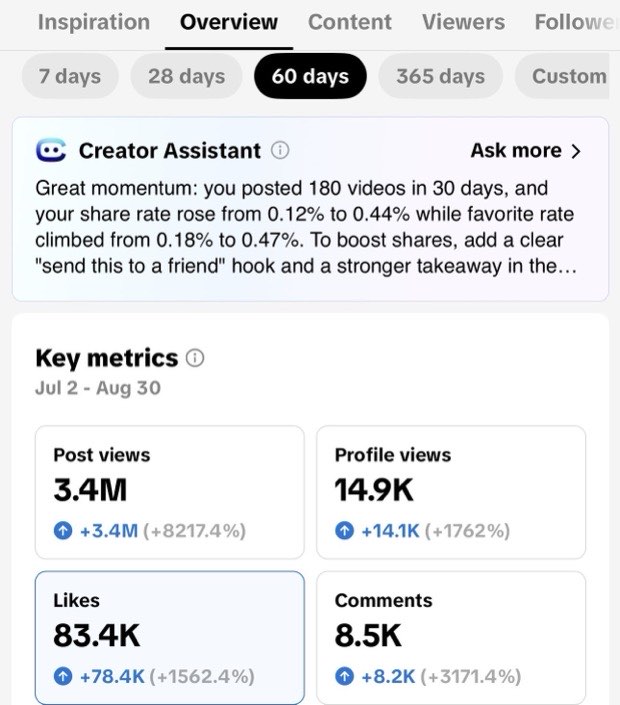
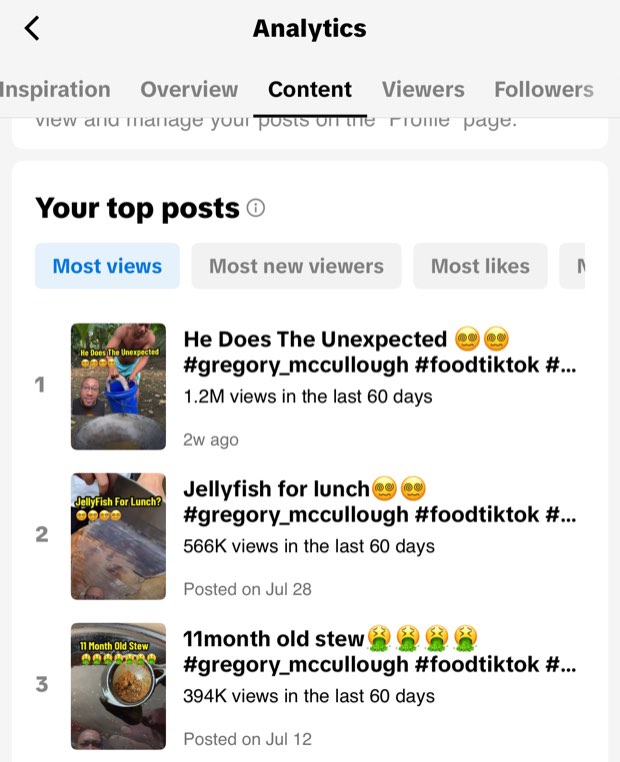
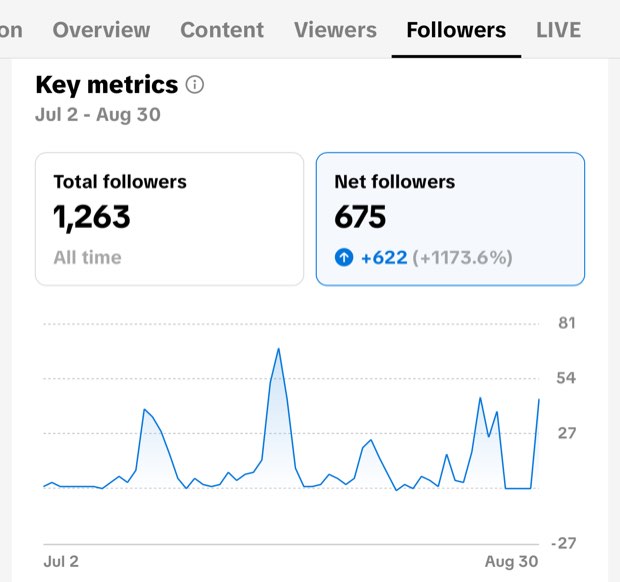
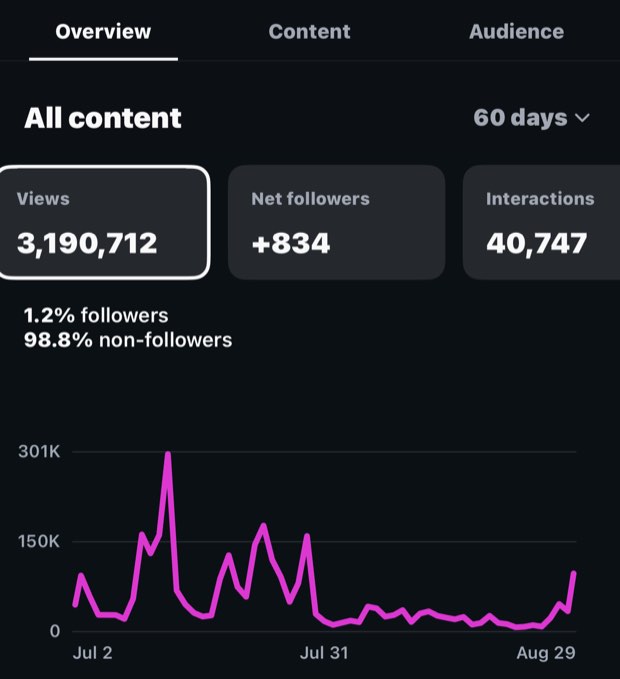
Straight off the analytics screens: 2 July to 30 August 2026 on TikTok, 2 July to 29 August on Instagram. No ads, no boosting, no paid promotion of any kind.
In one 30 day stretch I posted 180 videos. 160 of them were made with this app, on my phone, in between everything else.
That number is the one that actually says something about the app. Views tell you whether people liked the video. 160 in a month tells you what one video costs to make. Nobody gets near that hanging a green screen, opening an editor and cutting two layers together, however good they are at it. I know, because that is what I was doing before, and I was managing a fraction of it.
I started at six a day. I am posting ten to twenty a day now, and the only thing that changed is that I stopped building each one and started recording it.
The app itself has not launched yet, so there are no user numbers to quote and I am not going to invent any. Here is what else is true right now and what you will be able to check on day one.
- It is built and it runs. This is not a concept. The app records, composites and exports on an iPhone today, and it is what I make my own reaction videos with.
- Nothing leaves your phone. Reaction Spark makes no network calls at all. No account, no upload, no server holding your footage. It is enforced by a check that fails the build if a single network call is ever added.
- No watermark, on anything. Including the free videos.
- The free videos are genuinely finished videos. Not previews, not lower quality, not stamped. You post them.
What you get
Three finished videos, free
Download it, make three reaction videos, and post them. No card, no account, no email address needed to do it. You meet the price after you have already got something out of the app, not before.
After that it is a subscription, with the exact plans and prices shown in the App Store listing before you ever tap anything. Cancel from your iPhone settings at any time, like any subscription.
Stop watching other people go viral. It is your turn.
I built Reaction Spark because I wanted to create content that was quick and easy to make, and I kept getting stopped by the tools. If you want to cut down the amount of time it takes you to shoot content, this is the one to have on your phone.
Gregory
Reaction Spark is coming to the App Store. Put your email in and you will be told the day it opens, before anybody else.
One email the day it opens. Nothing else, and you can leave in one tap.
P.S. If you scrolled straight to the bottom, here it is in one line. It is an iPhone app that records a reaction video with the clip on screen and you lifted off your background, no green screen and no computer, and the first three are free with no card. Put your email in and you will hear from me once, on the day it opens.
The questions you are actually asking
Do I need a green screen?
No. That is the entire point. Your phone works out where you are in the frame on its own, so it removes whatever is behind you without anything being hung up first.
Will it work in my normal room?
Yes. It separates you from whatever is actually behind you rather than from a special background. Like any camera, it does its best work when you are reasonably lit and not blending into the wall behind you.
Is it free?
Your first three videos are, with no card and no account. After that it is a subscription. The plans and prices are on the App Store listing, so you see them before you install, not after.
Will it put a watermark on my videos?
No. Not on the paid videos and not on the free three either. The video that lands in your camera roll is yours, unmarked.
Do my videos get uploaded anywhere?
No. The app makes no network calls whatsoever. Your footage is recorded, composited and exported on your phone and never goes anywhere else. There is no account to create because there is nothing to create one on.
Can it post to TikTok for me?
Not automatically, and we would rather say so than imply otherwise. It saves the finished video to your camera roll and opens the iOS share sheet, which hands it to TikTok, Instagram, YouTube or whichever scheduler you already use. You write the caption and hit post there, as normal.
Do I need to know how to edit?
No. There is no timeline and there are no layers to manage. You pick the clip, you record, and the video is finished when you stop talking.
What devices does it run on?
iPhone and iPad, on iOS 18 or newer. It leans on what recent Apple devices can do with the camera on the device itself, which is how it takes your background out without a green screen. There is no Android version and no desktop version.